
Three Time-Saving Tips to Streamline Your Assembly Planning
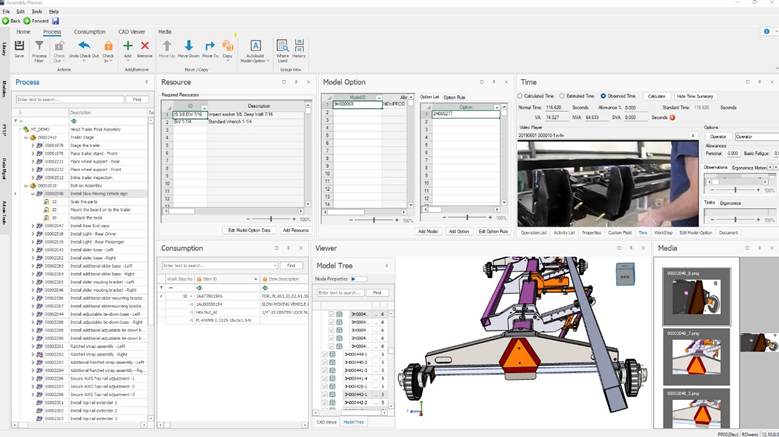
Proplanner is full of capabilities designed to make assembly planning faster, smarter, and more efficient. Whether you’re managing complex routings, time studies, or detailed process plans, there’s always more to discover.
Here’s three powerful features that can help you work faster, stay organized, and get more out of your data.
1. Make Routing Updates Faster
Making updates to a routing doesn’t have to mean opening every operation one by one. The Process Editor gives you a single grid view of your routing, so you can review and edit multiple operations at once.
How it works:
- Open your routing and click Process Editor on the toolbar.
- Select an operation row to start editing.
- Update work centers, durations, or other fields directly in the grid.
- Press Enter to save each change or drag-select multiple cells to apply updates in batches.
This feature is especially useful when you’re adjusting complex, multi-step routings or need to apply a consistent change across operations – such as a revised work center or updated cycle time. It keeps your focus on the process, not the clicks.
2. Build Reports That Work for You
Every manufacturer tracks performance differently, and Proplanner’s Report Designer lets you tailor reporting to your exact needs.
How to get started:
- Go to the Reports tab and click Designer.
- Choose a blank template or start from an existing one.
- Select your data source – Parts, Process Plans, or Routings.
- Drag and drop fields into your layout, grouping or filtering as needed.
- Customize headers, footers, and fonts to match your company’s reporting style.
- Preview and save before sharing or scheduling your report.
With Report Designer, you can turn raw production data into insights that actually support decision-making, whether you’re tracking efficiency across work centers or comparing planned versus observed times.
3. Streamline Time Studies in the Observed Time Editor
If you frequently conduct time studies, the Observed Time Editor can help you stay focused on what matters most. By customizing and saving your preferred layout, you can display only the fields that matter – like Observed Time, Task Observations, or MUDA – so you never waste time hunting for data.
Why it’s useful:
- Add or remove columns for a cleaner workspace.
- Save your custom layout as a workspace you can reload anytime.
- Maintain consistency across large studies with fewer manual adjustments.
For large-scale time studies, use the Observed Time Editor to maintain accuracy and consistency while cutting down on repetitive entry.
Work Smarter with Proplanner
Small workflow changes can lead to significant time savings across your organization. Whether you’re fine-tuning routings, designing reports that matter, or refining time study analysis, these Proplanner tips are designed to help you work more efficiently and make better use of your data.
Keep an eye out for future Tips & Tricks as we continue to highlight practical ways to optimize your planning process and drive continuous improvement in your manufacturing operations.
- Honest conversation with a product expert
- Discover what products or solutions best fit your needs
- No games, gimmicks, or high-pressure sales pitch
Grace Barton
Marketing Specialist
About the Author Latest Posts
Grace Barton is a digital marketing and competitive intelligence professional who crafts strategic narratives by bridging marketing insights with analytical expertise. At Advantive, she creates engaging, data-driven content tailored to the distribution, manufacturing, packaging, and quality industries. Her goal is to deliver impactful messaging that drives engagement and growth based on specific gap closure needs, whether responding to sales organization requirements, pinpointing gaps in content, or meeting immediate market trends.
She thrives on transforming competitive intelligence into actionable insights for the sales organization. Grace manages Advantive’s competitive intelligence platform, Klue, to equip the sales team with the battlecards and market data they need to stay ahead of competitors. Since launch, she’s built 28+ battlecards across four lines of business, ensuring the GTM strategy stays sharp.
Grace has a passion for leveraging market insights with storytelling to guide strategic decision-making, empower sales organizations, and nurture organizational growth.
Areas of Expertise: Digital Marketing, Competitive Intelligence, Strategic Narratives, Marketing Insights, Analytical Expertise
- Why Scheduling is Still the Hidden Lever in Corrugated Packaging May 14, 2026
- From Data to Decisions: What AI Could Unlock Inside Your ERP April 30, 2026
- From Data to Direction: Why Advantive ONE Signals a New Era of Industrial AI April 14, 2026
- When the Warehouse Becomes the Bottleneck April 9, 2026
- The Power of Virtual Assistants When They’re Built for Real Work February 3, 2026