
Manual Data Collection Made Easy: Data Collection Series #1
Data collection is an essential part of your daily routine in manufacturing. It’s the engine that drives your quality improvement efforts, whether they are continuous improvement, Six Sigma, Lean, statistical process control (SPC), or anything else. From the data you collect you can discover things about your operation that you might never know from walking the plant floor.
This blog series on Data Collection is designed to illustrate how the InfinityQS® native-cloud quality intelligence platform, Enact®, can make data collection easy for any company.
This blog, our first in the series, will focus on manual data collection; then we’ll move into semi-automated data collection; and we’ll finish up with fully-automated data collection.
Manually collecting your quality data should be easy. It should be straightforward, visual, and engaging. Enact does all this and more…Enact guides you to what you need to collect.
Enact Just Knows How to Help Users Focus
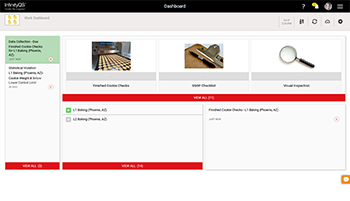
Through “targeted” dashboards, Enact surfaces crucial quality information and notifications specific to each user. In short, that means that you, as an operator (or other data collector) on the shop floor, see only what you need to see—because Enact knows your role and responsibilities. No fuss, no muss.
After Enact is configured, when a particular user logs in at 8am every day, they see only what they need to see for that particular day in order to do their job. No hunting, no sifting, no clicking around to get to what they need, and no distractions. Enact enables users to focus on what’s important for them to do their jobs.
Enact surfaces only the information users need to perform their duties. Enact…just…knows.
Enact Makes Data Collection Easy
Enact can limit manual data collections to specific users, roles, and/or workstations. This means that the Line 2 Operator (let’s call her Ann to keep things simple) never needs to see or deal with the alerts or data for Mike, the Line 3 Operator—or any other user, for that matter. Ann only sees data and alerts for her line, or her role.
So, here’s how it works: at 9am a notification comes up to let Ann know that it’s time for her to check the weight and diameter of the product on her line (in our example, we’re making cookies; easy…and tasty). She simply clicks on the image for her checks, and the data collection screen displays.
Notice how visual data collection is with Enact. These customizable images are configured ahead of time to make data collection so easy that the operator needs only to recognize the picture of the item to be measured and enter the appropriate data.
A Word About Enact Configuration
Here’s how configurable Enact is: in the example above, if you wanted your operator to weigh three cookies (instead of one), for instance, you could place a graphic on the scale that depicts three stacked cookies. It all depends on how much detail you need, and how foolproof you want to make things.
Notice also that Enact generates Work Instructions along the top of the screen. They’re very general by default, but you can configure these to be as detailed as you feel is necessary. Anything to make data collection easy…and visual.
Like Training on the Job
Let’s look further at the above image. Notice that in the Data Entry field (labeled “Cookie Weight” for this group of measurements) the system is telling the operator that this is one measurement of three (“Piece 1 of 3”). Also notice in the “film strip” below (the horizontal group of images) that this entire data collection process consists of three weight measurements and three diameter measurements…the icons help make that clear. The operator only needs to enter their data and can see exactly what’s coming next.
So, all Ann needs to do here is take the measurement(s), manually enter the weight(s) in the Data Entry field, and then click Save. It’s that easy. And then carry on her duties like every other day until the next data collection comes up on her screen. And the next user sees what they need to see and do…and so on…it’s like a training tool on the job!
Enact Works Like You Do
Enact makes manual data collection easy because it just knows what the user needs to see and do and when they need to see it and do it. And you can set things up like this for any data entry, any kind of measurement or group of measurements. Data collections can be performed based on conditions, such as time or equipment status, or can be performed manually without any timer. This gives your users peace of mind because they don’t have to watch the clock; and it gives them the flexibility to enter additional data beyond timed requirements, if desired.
While we’ve been focusing on variable data, the same flexibility can be applied to attribute data or even checklists, enabling your users to capture the data they need. With all of these tools, your operators are free to focus on their many other duties…until the next data collection event.
Semi-automated data collection is an attractive option for many manufacturers because it saves time and helps them be more accurate. For our next blog we’ll look at how Enact makes semi-automatic data collection easy, too.
Learn more about Enact.
Grace Barton
Marketing Specialist
About the Author Latest Posts
Grace Barton is a digital marketing and competitive intelligence professional who crafts strategic narratives by bridging marketing insights with analytical expertise. At Advantive, she creates engaging, data-driven content tailored to the distribution, manufacturing, packaging, and quality industries. Her goal is to deliver impactful messaging that drives engagement and growth based on specific gap closure needs, whether responding to sales organization requirements, pinpointing gaps in content, or meeting immediate market trends.
She thrives on transforming competitive intelligence into actionable insights for the sales organization. Grace manages Advantive’s competitive intelligence platform, Klue, to equip the sales team with the battlecards and market data they need to stay ahead of competitors. Since launch, she’s built 28+ battlecards across four lines of business, ensuring the GTM strategy stays sharp.
Grace has a passion for leveraging market insights with storytelling to guide strategic decision-making, empower sales organizations, and nurture organizational growth.
Areas of Expertise: Digital Marketing, Competitive Intelligence, Strategic Narratives, Marketing Insights, Analytical Expertise
- Why Scheduling is Still the Hidden Lever in Corrugated Packaging May 14, 2026
- From Data to Decisions: What AI Could Unlock Inside Your ERP April 30, 2026
- From Data to Direction: Why Advantive ONE Signals a New Era of Industrial AI April 14, 2026
- When the Warehouse Becomes the Bottleneck April 9, 2026
- The Power of Virtual Assistants When They’re Built for Real Work February 3, 2026